
Peec AI and Otterly.AI both track how brands appear in answers from AI search platforms. Give them questions your customers might ask and they can show brand mentions, competing brands, and cited sources. Those results are monitoring samples, not a record of every answer a real customer sees.
The right choice depends on how many questions you need, which engines matter, how many brands you manage, and what you need to do after finding a problem. Otterly's $29 Lite plan is a low-cost way to start with 15 prompts. Peec's $95 Starter plan covers 50. At 100 prompts, the price comparison changes again.
- Starting with 15 prompts or fewer? Consider Otterly Lite, provided one workspace is enough. Gemini, Google AI Mode, and Claude cost extra.
- Tracking roughly 50 prompts for one brand? Peec Starter covers 50 prompts across three selectable models. Check the countries and models available to your account.
- Managing more prompts or several clients? Compare the complete workload. Otterly Standard's public price is lower at 100 prompts, while agency buyers should also check project limits, monitoring credits, workspaces, and client permissions.
Prices below are publicly listed US-dollar monthly prices checked November 2, 2026, before tax. Annual billing, location, promotions, and negotiated terms can change the total.
What the same monitoring workload costs
The following examples assume one brand, one country, daily monitoring, and the same three shared engines: ChatGPT, Google AI Overviews, and Microsoft Copilot. Otterly's package also includes Perplexity; choosing not to use it does not reduce the plan price.
| Prompts monitored daily | Peec brand plan | Otterly plan | What changes |
|---|---|---|---|
| 10 | Starter: $95/month, 50-prompt allowance | Lite: $29/month, 15-prompt allowance | Otterly costs less for a small initial set. |
| 50 | Starter: $95/month, 50 prompts | Standard: $189/month, 100 prompts | Otterly Lite is too small; Peec Starter fits this workload. |
| 100 | Pro: $245/month, 150 prompts | Standard: $189/month, 100 prompts | Peec requires an upgrade; Otterly Standard covers exactly 100. |
A tracked prompt is a question the platform runs repeatedly, not a count of actual customer searches. Peec calculates 50 prompts × 3 models × 30 days as approximately 4,500 monitored AI answers. That is neither 4,500 real users nor 4,500 visits. The packages also differ in unused capacity, engines, countries, and features; the table compares published prices for the stated requirements, not identical bundles. Peec pricing; Otterly pricing.
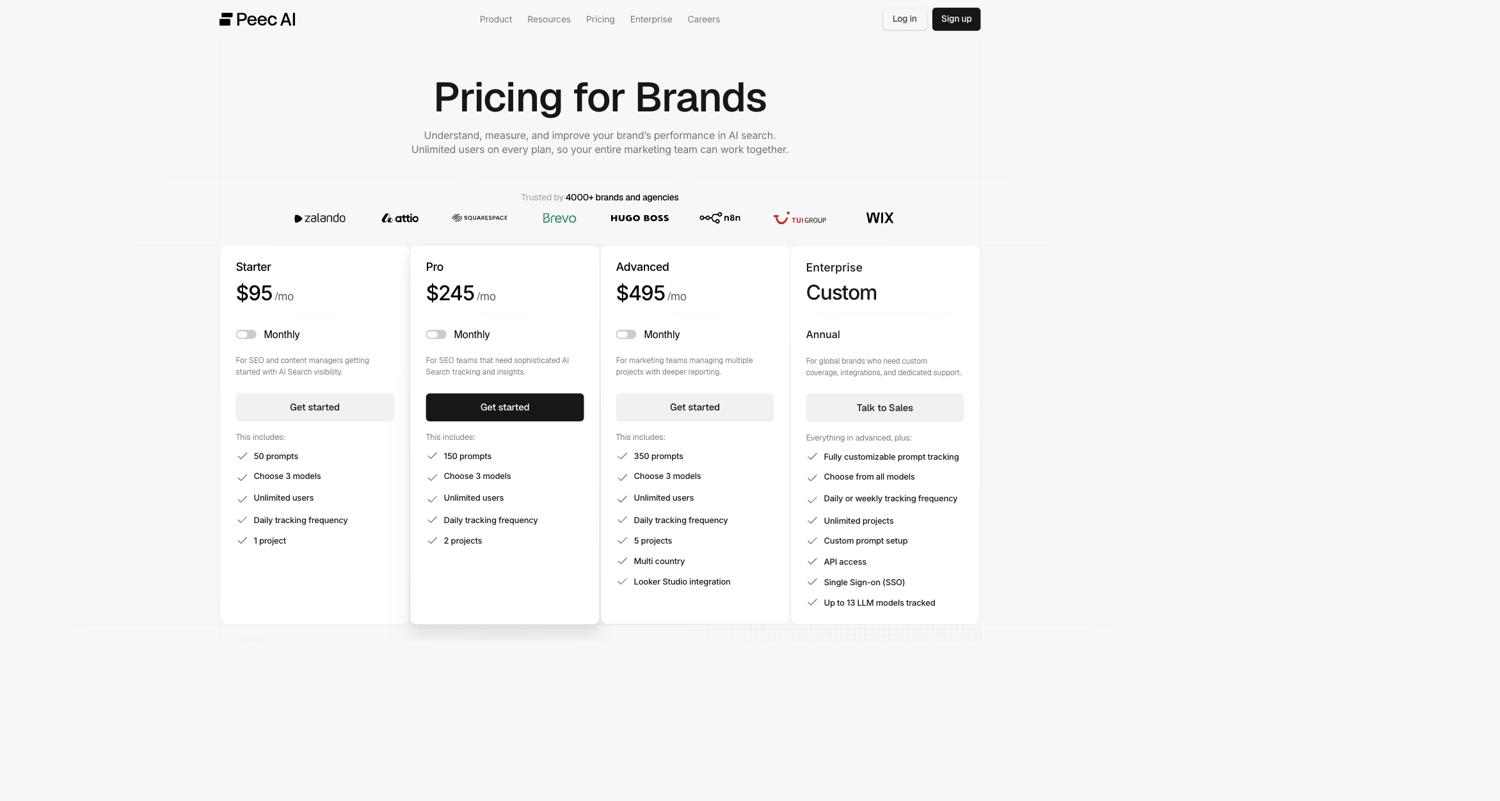 Peec's brand pricing page shows monthly prices, prompt allowances, model counts, and projects. Check the full comparison table for country limits.
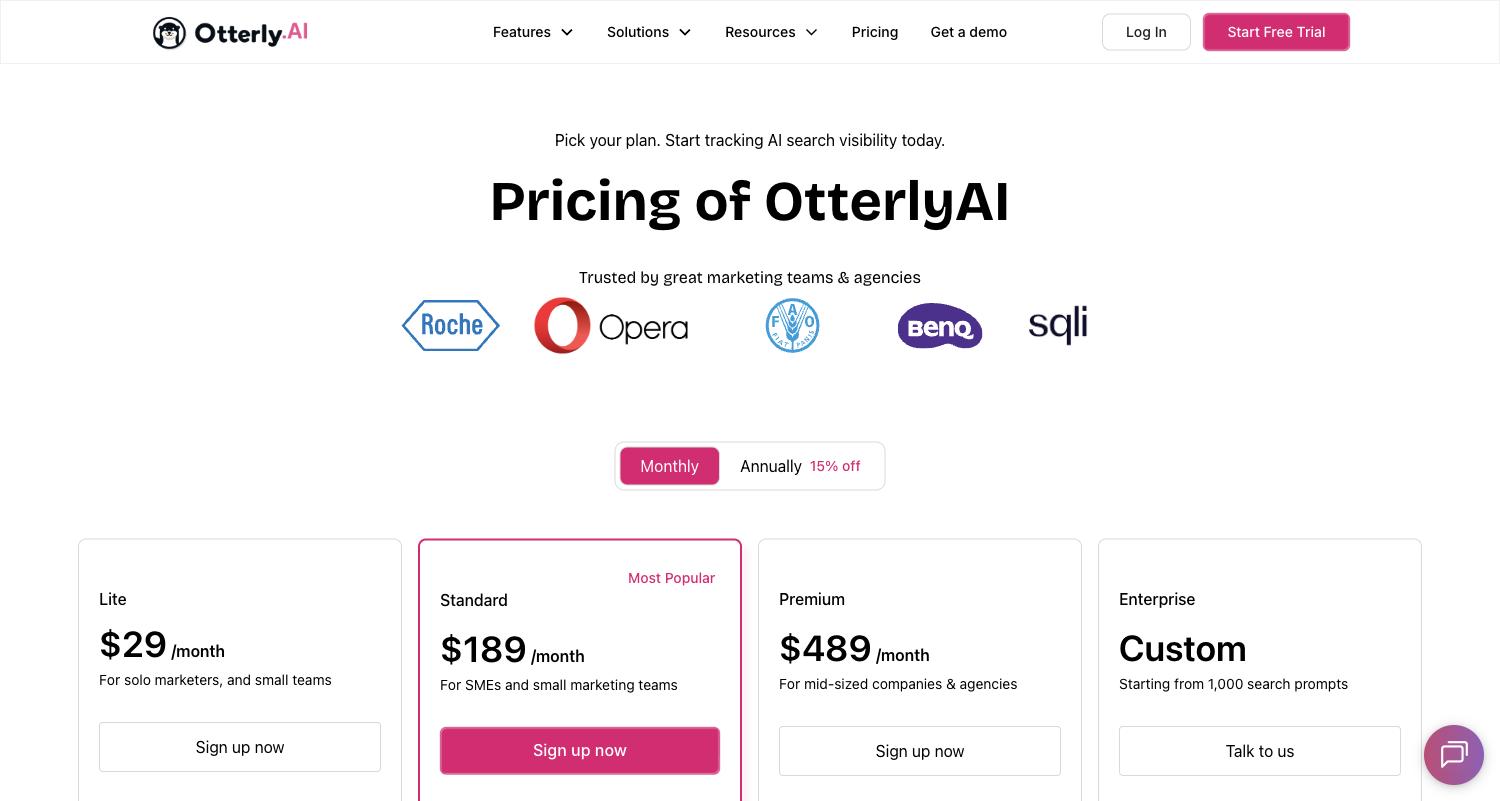 Otterly's monthly prices. Prompt allowances and engine add-ons are listed in its detailed plan information.
Check the engine mix before comparing totals. Peec's plan matrix lists ChatGPT, Google AI Mode, Google AI Overviews, Microsoft Copilot, Gemini, and Naver AI among the selectable models on brand self-service plans. Perplexity appears in its additional-model list, but different parts of the site describe availability differently. If it is essential, confirm the actual account and add-on terms. Otterly includes ChatGPT, Google AI Overviews, Perplexity, and Microsoft Copilot; Gemini, AI Mode, and Claude are add-ons.
For example, suppose the 100-prompt workload also needs Gemini in addition to the three shared engines. Otterly Standard plus its published $59 Gemini add-on totals $248/month. Peec Pro includes three selected models; retaining all three and adding a fourth at the published $85 Pro add-on totals $330/month. If Gemini replaces one of the three, rather than being a fourth, recalculate. Confirm engine availability and terms at checkout. Peec model pricing; Otterly pricing.
Feature comparison: included is not the same as unlimited
✓ means the capability is listed for that plan; ✕ means it is not included. Actual limits, country coverage, and model access should be checked before purchase.
| Capability | Peec Starter / Pro | Otterly Lite / Standard | Why it matters |
|---|---|---|---|
| Brand mentions, competitors, sentiment | ✓ / ✓ | ✓ / ✓ | Both show brand presence; review sentiment labels against the actual answer. |
| Answer and citation tracking | ✓ / ✓ | ✓ / ✓ | Inspect the answer and its displayed sources before selecting an action. |
| Daily monitoring | ✓ / ✓ | ✓ / ✓ | Daily data is useful for trends; a one-day change is not an outcome. |
| Prompt allowance | 50 / 150 | 15 / 100 | Count the questions you need before choosing a tier. |
| Active engines | Choose 3 / choose 3; add-ons available | 4 included / 4 included; selected engines cost extra | Check your exact engine mix, not just the number. |
| Projects or workspaces | 1 / 2 projects | 1 / unlimited workspaces | Client separation and permissions still need to be verified. |
| Countries | 1 / 3 in the plan matrix | Multiple countries and languages; confirm available locations | Peec's FAQ and plan matrix do not fully agree, so confirm your account's limits. |
| API | ✕ / ✓ | ✕ / ✓ | Neither entry plan should be assumed to include API access. |
| MCP | ✓ / ✓ | ✕ / ✓ | Otterly lists MCP from Standard; Peec lists it on Starter. |
| Recommendations and content diagnostics | ✓ / ✓, with agent credits | ✓ / ✓, Lite recommendations limited | Inspect whether a recommendation points to a page or an action your team can complete. |
Sources: Peec plan matrix, Peec API availability, and Otterly plans. A check mark identifies a capability, not unlimited usage or identical implementation. Peec's summary cards highlight API under Enterprise, while the plan matrix and help center also list it for Pro and Advanced. Confirm it before purchase if API access is essential.
What happens after you add a question?
Suppose a multichannel inventory software company wants to know why competitors appear for “best inventory software for cross-border sellers.” Both platforms can show mentions and sources. Their workflows give the team different ways to investigate and act.
Finding prompts worth tracking
Peec lists prompt suggestions based on brand context and coverage gaps, prompts from keywords, personas, and tags. It also scores relative demand for the topic behind a prompt on a 1–5 scale. That score is not a count of real ChatGPT searches. Peec's plan matrix.
Otterly's AI Prompt Research accepts an SEO keyword, a URL, or a brand, domain, and industry to suggest questions. Query Fan-Out expands a question into related queries and intents. Otterly says its Intent Volume is an estimate based on Google search volume, not a record of real AI search queries. Treat generated questions as candidates to review, not a complete transcript of an AI engine's internal searches. Otterly prompt research; Intent Volume explanation.
If you already have support tickets, sales objections, or search queries, both tools can monitor a manually selected set. If you need to start from a URL, Otterly documents a direct workflow; Peec's own discovery features should also be evaluated during a trial. Remove irrelevant or near-duplicate suggestions before they consume your allowance.
Finding the sources where competitors appear
In Peec, open Sources, choose Domains or URLs, and turn on Gap Analysis. It filters for cited sources that mention competitors but not your brand. Add at least one competitor and allow enough time for results to accumulate. If a relevant software directory repeatedly appears in answers and lists competitors, examine its inclusion criteria and provide accurate product information. If the source is a forum thread, assess the discussion before participating. A blank report can mean the project is new, the filters are too narrow, or no competitor has been configured. Peec Gap Analysis.
In Otterly, open a prompt's detail view and inspect the Citations tab. It lists URLs, citation counts, domain categories, and associated brands or competitors. Start with important prompts, then investigate recurring sources. Otterly also has citation and domain reports, so source analysis is not unique to Peec. Otterly prompt detail.
Peec's dedicated gap filter is worth testing if your main job is finding sources where rivals are present and you are absent. Otterly's prompt-level view is useful when you want to move from one question to its answers, citations, and report. Neither product can decide whether a third-party source is worth pursuing or guarantee a listing.
See the official Otterly prompt-detail examples for screenshots of citations, answers, and brand coverage.
Turning a finding into work
Peec's Optimize → Actions ranks recommended improvements with supporting evidence. A user can accept an action, mark it in progress or done, or decline it. It is useful for organizing follow-up on visibility and source gaps, although someone still has to judge the evidence and do the work. Actions depend on account permissions. Peec Actions; improvement guidance.
Otterly's GEO Audit includes crawlability and content checks for a specified URL, plus Query Fan-Out for a question. Its content check scores elements such as summaries, section structure, and readability and suggests changes. This is useful once you have a specific page to inspect. Entering the homepage checks that URL, not the entire site, and a high tool score does not guarantee an AI citation. Otterly GEO Audit.
Both products offer recommendations and some page or crawler-related capabilities. Peec's Actions help organize opportunities into follow-up work; Otterly's audit gives a page-level diagnostic. Publishing content, correcting product information, contacting a publisher, and measuring business outcomes remain the team's responsibility.
Shopping: brand mentions versus product recommendations
Peec AI Shopping can connect a Shopify catalog or accept a CSV and offers product-level visibility and position. Its help center says the current shopping report focuses on ChatGPT shopping carousels: a plain-text product mention without a carousel does not count there. If visibility is zero, check the catalog, prompt coverage, and whether a carousel was triggered before concluding that the product never appears in ChatGPT. Catalog syncing and shopping-prompt usage have different credit rules. Peec Shopping visibility; credit rules.
Otterly flags Shopping Cards in prompt details and shows products appearing for those questions. Its documentation also describes ad tracking but currently notes that advertiser reporting is paused. Verify its status if ad intelligence is a reason to buy. Otterly Shopping and ads.
For a catalog with many SKUs, test Peec's import and product matching. For a first look at whether important questions trigger shopping cards, test Otterly's prompt details. A product card alone does not establish a sale.
Exports, crawlers, and referrals
Otterly lists prompt and citation CSV exports, raw answer CSV/JSON, brand-report PDFs, and GEO Audit PDFs across its plans. Standard includes API access with 2,000 requests per month. Peec Starter lists CSV and MCP; Pro adds API, while the brand-plan matrix lists Looker Studio from Advanced. Test the exact fields, history, and permissions your team needs. Otterly exports; Otterly API; Peec pricing.
Otterly's Agent Analytics starts at Standard and supports log uploads and connections such as Webhook, Cloudflare, and WordPress. Confirm separately what a live connection receives and how to upload historical logs. Peec lists crawl insights and AI referrals, with supported log and platform integrations. A crawler visit is not a person visiting. Peec's AI Referrals reads GA4; its documentation says Google AI Overviews and AI Mode traffic is counted as Organic Search, while some app visits without a referrer can appear as Direct. The report is therefore not a complete count of AI-driven traffic. Otterly Agent Analytics; Peec AI Referrals.
One brand or five clients: account structure changes the math
For a single brand, Peec Starter's one project and one-country allowance may be enough for a focused set of questions. Teams needing separate client areas, more markets, or API access should include the relevant upgrade in the budget. Otterly Lite's 15 prompts may also become restrictive as a question set expands.
For an agency, assume five clients, 30 different prompts each, three engines, daily monitoring, and a 30-day month:
- Peec agency: 5 × 30 × 3 × 30 = 13,500 monitoring credits. Essential lists 10,000 credits and three projects, so it is insufficient. Growth is $495/month for 25,000 credits and 10 projects, enough under this workload. Confirm engine and country configuration and any available add-ons.
- Otterly Standard: Five workspaces fit its published unlimited-workspace allowance. The 150 distinct prompts exceed the 100 included, so adding 100 at $99 gives an estimated $189 + $99 = $288/month. This assumes the extra allowance can be allocated across the relevant workspaces; confirm client permissions and contract terms.
These are not identical packages or a verdict on agency delivery. Otterly has a separate agency partner program whose benefits and eligibility require confirmation. Peec's monitoring credits are different from credits for agent actions. Peec agency pricing; monitoring credits; Otterly pricing.
Build a prompt set that represents buyer decisions
A set made entirely of “What do you think of our brand?” can look healthy while missing customers who do not know the brand exists. Start with 15 prompts, then expand the set to cover more relevant buying decisions.
| Source | Starting count | Inventory software example | Purpose |
|---|---|---|---|
| Search Console and site search | 4 | “best inventory software for ecommerce” | Cover existing category demand. |
| Sales and support questions | 4 | “how can a small seller avoid overselling across marketplaces” | Reflect customer language and problems. |
| Brand and competitor comparisons | 4 | “Brand A vs Brand B for multi-channel inventory” | Capture evaluation between known options. |
| Budget, team size, or other constraints | 3 | “affordable inventory software for a team of five” | Capture conditions that change a recommendation. |
These are illustrative prompts, not observed customer queries. Replace them with your own product, market, and customer language. Tag prompts by product, buying stage, country, and language. Keep a stable core set so a rising coverage score cannot be explained simply by replacing difficult prompts with easy ones.
Check brand aliases and competitors before interpreting results. Missing an abbreviation can undercount mentions; a brand name that is also an ordinary word can create false matches. Peec supports aliases and more specific matching rules. Inspect actual answers for both missed and incorrect matches. Peec alias guidance.
Turn a citation into a useful action
Suppose competitors repeatedly appear for a relevant question and your brand rarely does. This is a hypothetical workflow, not a claim about a measured brand.
- Check whether the question matters. If it asks for a free personal tool and you sell only to enterprises, absence may not be a business problem.
- Inspect the displayed answer and citations. Record the date, engine, answer, source URL, and whether your brand is named. A source from your domain can be cited without a brand mention, and a brand can be mentioned without its domain being cited.
- Classify the gap. A recurring independent review may need updated product details; a competitor's technical guide may reveal a missing explanation on your own site; a frequently cited study may suggest an opportunity to publish reliable, attributable data.
- Choose a concrete action. For example, clarify product limits, intended team size, pricing access, and common questions on an existing guide, or supply accurate information to a relevant directory. A single answer does not justify rewriting an entire site.
- Recheck the same questions. Record the change, date, and URL, then compare the same engines and locations over time. If nothing changes, check accessibility and whether the content actually answers the question before choosing another action.
In an Otterly study of AI search stability, researchers repeatedly sampled from 320 prompts while holding the brand, engines, and 30-day period fixed. With 10 prompts, 90% of coverage results fell between 39% and 71%; with 100 prompts, the interval was 51%–60%. This is a vendor study of a particular dataset, not a universal margin of error or proof that every brand needs 100 prompts. It does show why a small sample deserves careful interpretation.
Coverage, share of voice, and buying are different measurements
Align the prompt set, engines, location, dates, brand aliases, and valid answers before comparing reports. If a brand appears in 4 of 10 valid answers, its coverage is 40%. In Peec's example, if your brand has four mentions and a competitor has 12 in the measured set, share of voice is 4 / (4 + 12), or 25%. Coverage asks how often you appear; share of voice compares mentions among included brands. Peec's definition.
Otterly says Google AI Overview queries that do not trigger an overview are excluded from its coverage denominator. If 10 checks are scheduled, only six produce an overview, and three of those mention your brand, the coverage is 3 / 6 = 50%, not 3 / 10. That does not mean half of Google users saw the brand. Otterly KPI definitions.
Otterly also has a “Likelihood to Buy” metric derived from average brand position in an answer. It is a platform index, not an observed purchase probability or conversion rate. Report monitored visibility, crawler requests, citations, visits, leads, and sales as distinct events.
Test both products against the same buying checklist
Use 10–15 fixed prompts, one country and language, the same brand aliases and competitors, and engines available on both products. Record the dates and configuration. Otterly currently lists a seven-day trial; check Peec's current trial terms at signup. Otterly trial details.
| Test | What to do | What a useful result looks like |
|---|---|---|
| Understand the data | Inspect at least 10 answers per platform; check brand matches, competitors, URLs, and dates. | Your team can trace metrics back to answers and explain obvious mismatches. This small sample does not establish overall accuracy. |
| Find an action | Use the same prompt to inspect rivals, sources, and recommendations. | You can name an owner, a target page or source, and a way to recheck the change. |
| Deliver a report | Export answers, citations, and a brand report. | The fields, format, access rights, and history meet stakeholder needs. |
| Manage clients | Demonstrate two projects or workspaces and check user roles. | Client and internal access match the intended delivery model. |
| Budget for growth | Recalculate using expected prompts, clients, engines, countries, and add-ons in three months. | You understand the full plan, tax, and expansion cost. |
Do not expect identical answers from two products on every run: timing, geography, collection method, and AI output can differ. Compare whether the information is traceable and useful for the job, rather than declaring one tool more accurate from a handful of differently timed answers.
Protect history. Otterly says prompt text cannot be edited after creation. Deleting a prompt permanently removes its history, and a replacement cannot retrieve data from before it was added. A prompt's country cannot be changed either; tracking the same question in another country requires a new prompt, with separate history and potentially more allowance. Export what you need and check capacity before changing the set. Prompt restrictions; country settings; deleting a prompt.
A four-week evaluation plan
| Week | Work | Evidence to retain | Decision |
|---|---|---|---|
| 1: Baseline | Fix prompts, aliases, competitors, countries, and engines. | Export valid answers, coverage, and citations by prompt and engine. | Adjust the scope or budget if key prompts do not fit. |
| 2: Opportunities | Inspect 2–3 relevant questions where competitors recur. | Save answer text, source URLs, and the specific gap. | Only add an item to the backlog if the next action is clear. |
| 3: Action | Improve one relevant page or update one third-party listing. | Save the before-and-after page and publication date. | Confirm that the information is accurate and publicly accessible. |
| 4 and beyond: Review | Recheck the same prompt set, engines, and geography. | Track valid answers, mentions, sources, and separately identifiable referrals and conversions. | Continue observing if samples are small or the change is recent. |
Four weeks is a management cadence, not a promise of results. Answers vary and competitors may make changes at the same time. A stable comparison set can help interpretation, but a simultaneous increase still does not establish causation. See the AI visibility metrics and KPI guide for longer-term measurement.
Which should you choose?
A small team testing the channel: Otterly Lite is a reasonable low-cost start if 15 questions and one workspace cover the immediate decision. Add Gemini or AI Mode costs if required, and compare Standard with Peec Starter when the set grows.
One brand with a defined content plan: Peec Starter deserves a look when 30–50 prompts, three models, and one country are enough. Verify Perplexity, country, and API requirements before buying.
A team approaching 100 prompts: Otterly Standard's 100-prompt allowance, API, and multiple workspaces may fit. Peec Pro allows 150 prompts and two projects, so its spare capacity can matter if demand is growing. Test both on the same questions and business tasks.
An agency or multibrand team: List clients, prompts per client, engines, frequency, countries, permissions, and exports before asking for prices. Peec's shared monitoring credits can be allocated among projects; Otterly's Standard workspaces and prompt add-ons make an initial calculation straightforward. Confirm client isolation and partner terms in either case.
For a broader enterprise comparison, see Profound vs Peec AI and Profound vs Otterly.AI.
Frequently asked questions
Is Peec AI or Otterly.AI cheaper?
It depends on the workload. For one brand and the three shared engines above, 10 prompts fit Otterly Lite at $29/month; 50 fit Peec Starter at $95 versus Otterly Standard at $189; 100 require Peec Pro at $245 versus Otterly Standard at $189. Engines, countries, add-ons, taxes, and billing terms can change the total.
Can both track ChatGPT and Google AI Overviews?
Yes, subject to the selected plan, country, and prompt configuration. Otterly sells Gemini, Google AI Mode, and Claude as add-ons. Peec brand self-service plans include three selectable models and charge for additional models.
Does higher AI visibility mean higher sales?
Not by itself. It shows a change within a selected monitoring sample. Assess business impact separately using identifiable AI referrals, lead quality, and sales data while accounting for incomplete attribution and other marketing activity.