

Mobile Google Search clicks across nine language sites increased from 233,398 to 234,529, a rise of about 0.48%. In the same review, the backend's SEO group recorded a fall in mobile UV, or unique visitor counts, from 510,678 to 488,200, about 4.4%.
The search report seemed to show growth. Recorded mobile UV in the backend had fallen by more than 22,000. Should the next action focus on search performance or on how website visits were being measured?
When I reviewed two checks of multilingual sites from 2025, I found two issues that needed attention first. In one check, the latest day was incomplete. In the other, the counting units and scope of the two totals had not been matched. Treating them as two measurements of the same activity would make it easy to reach a conclusion too soon.

Check completeness before calculating a daily decline
In the first check, backend mobile UV rose about 5.9%, and listing-page UV rose about 8.1%. GSC listing-page clicks, examined by language site, showed different directions.
One site's GSC chart looked concerning. It showed 1,743 clicks on November 17, 2025, compared with 7,069 on November 10, the corresponding day of the previous period. The line dropped sharply at its final point. Calculating a percentage decline from those two values would make it look like a substantial loss of search traffic in a single day.
But the final point already carried a notice that it covered only part of the day. Comparing half a day with a full day cannot measure the change between complete days. That notice should send the investigation back to the date range before anyone changes pages or attributes the decline to an algorithm change.
The incomplete latest day had been identified, with a plan to check again after the update. That is a reason to avoid calculating a decline using this data point. It does not establish that clicks recovered once the data was complete. A later, complete observation would be needed to answer that question.
For a current check, open the date settings in GSC's Search results report, confirm the end date and inspect the latest chart point. Google explains that the newest data may still be incomplete and that a dotted line indicates preliminary data. The report's last updated date identifies the latest day with any data; it does not establish that the day is complete. Google's explanation of data freshness
I would stop both comparison periods at dates confirmed to be complete, preserve the current export, and export the same scope again after the update. If one period covers a full week while the other lacks its final half-day, match the dates first. Leave missing coverage as missing rather than filling it with zero, and avoid calculating a recovery rate from an unfinished point.
What do clicks and visitor counts measure?
In the second check, recorded backend mobile UV fell about 4.4% while GSC clicks across nine language sites rose slightly. GSC compared December 16–22 with December 23–29, 2025. The backend used two consecutive weeks, but its exact day boundaries had not been confirmed. Knowing that search data can arrive late was no longer enough to explain the difference. The counting units needed checking too.
GSC clicks measure clicks from Google Search results. UV usually means visitors counted under a particular identification and deduplication rule, but the backend's own definitions determine how those rules work. One person can enter a website from Search more than once during a reporting period. Clicks and visitor counts can therefore change differently; there is no reason to expect a one-to-one match. Google's Search performance metric definitions
The scope presented a further problem. The second GSC total explicitly covered mobile clicks across nine language sites. It excluded five other language sites listed alongside them. The backend recorded mobile UV for its SEO group without fully specifying which language sites it covered or how it identified SEO traffic.
The difference between +0.48% and −4.4% therefore contained at least two questions: clicks and visitors are different counts, and the language sites included in each total had not been matched. Subtracting those percentages and calling the result a "lost-visit rate" would have no basis.
| Values in the second check | Earlier period | Later period | Change | What still needs confirming |
|---|---|---|---|---|
| Mobile GSC clicks across nine language sites | 233,398 | 234,529 | +1,131; about +0.48% | Sites, pages and device filters |
| Recorded mobile UV in the backend SEO group | 510,678 | 488,200 | −22,478; about −4.4% | Language coverage, source classification, deduplication and day boundaries |
This table establishes how each recorded value changed. Deciding what to do next requires putting them against the same sites and pages.
If the site uses GA4, I would start with sessions from google / organic and compare their trend with GSC clicks for the same scope, rather than taking all visitor counts. Google's joint analysis guide recommends clicks and sessions as the closest metrics for this comparison. They are still different counts and need not match exactly. For a custom backend, establish the field definitions first; renaming its UV does not turn it into GA4 sessions. Google's guide to using GSC and Analytics together
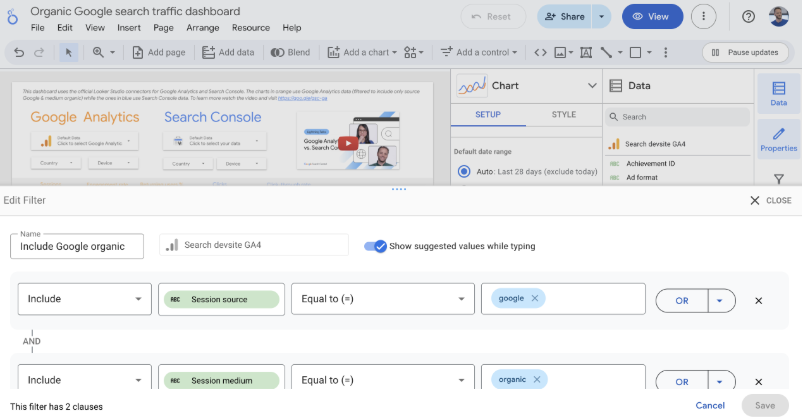
Both conditions in the image must apply: Session source = google and Session medium = organic. Using only the Organic Search channel can include other search engines. Using only Google as the source still leaves organic and paid traffic to separate. After confirming the source filter, select the same landing pages, countries and devices.
Compare the same set of pages in both reports
I would begin with one language site and one listing-page group, small enough to check individual URLs, before expanding to other sites. This gives a discrepancy a concrete place to investigate instead of leaving it between two unexplained totals.
In GSC, open Performance → Search results, choose custom comparison dates and confirm the search type. Keep the same Country, Device and Page conditions within a comparison, recording them with the export time. Do not assume that the backend's "mobile" category matches GSC's mobile device category: tablet and app visits also need checking.
Identical date labels can still represent different day boundaries. GSC's regular date views use Pacific Time, while its 24-hour view uses the browser's local time zone. A backend that groups days in Beijing time begins and ends its days at different moments. When timestamped visit records are available, aggregate them in the same time zone. If only daily totals using different boundaries are available, retain that limitation rather than claiming an exact match. Google's dates and time zone guidance
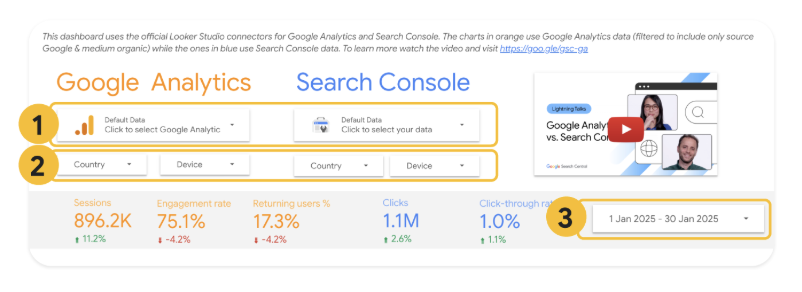
In the backend, select the corresponding site, page group and device conditions, then check how SEO traffic is identified. With GA4, check session source and medium in the Traffic acquisition report, then filter the Landing page report to google / organic for the same page group. State whether the chosen metric is users, sessions or page views; labelling them all "traffic" does not make them comparable.
Check page addresses as well. Most GSC page performance data is credited to a canonical URL, the address Google uses to consolidate signals for duplicate pages. A backend may record the URL the visitor actually reached. Map parameter URLs, mobile versions and landing pages after redirects before comparing their records. This calls for checking URL mappings, not changing canonical settings just to make totals agree. Google's explanation of page data attribution
Save the filters and export after each step. If matching the language sites narrows the difference, keep investigating scope. If the directions still differ after incomplete dates are removed, check sources, URL attribution and visit records. Preserving each result tells you which adjustment changed the interpretation.
Once the scope matches, find the page groups that changed
The second backend check contained another useful detail: the recorded decline did not occur in every page type.
Product detail pages recorded 18,066 fewer UV, a fall of about 4.5%. Three listing-page groups also declined. Homepage UV, however, increased from 13,095 to 14,557, about 11.2%. Those differences give the investigation somewhere to start without treating the whole site as one failure.

| Page group | Earlier UV | Later UV | Approximate change |
|---|---|---|---|
| Product detail pages | 401,847 | 383,781 | −4.5% |
| General listing pages (SRP) | 48,962 | 47,166 | −3.7% |
| Online listing pages | 36,419 | 34,058 | −6.5% |
| Discount listing pages | 14,492 | 12,868 | −11.2% |
| Homepage | 13,095 | 14,557 | +11.2% |
| Other SEO pages | 756 | 801 | +6.0% |
Adding these group UV counts does not reproduce the backend total. Until the deduplication and coverage rules are confirmed, the fall in one group's count cannot be stated as a percentage contribution to the total decline. The groups are more useful for choosing the next pages to inspect.
I would sample product detail pages and the declining listing-page groups, then look at the rising homepage for differences. The homepage serves a different purpose and attracts a different visitor mix. It can help locate a difference without acting as an experimental control that proves a change worked.
If GSC clicks and backend Google organic sessions both decline for the same pages, investigate queries, impressions, rankings and search demand. If GSC clicks remain relatively stable while backend records fall sharply, examine how visits are recorded. On sites using browser-based measurement, check whether the analytics code loads on each page, whether consent settings changed, whether redirects affect recording and whether page loading fails. These are leads to test. Opposite trends alone do not establish a missing tracking tag.
With measurement that depends on browser scripts, a search click may be counted even when the website fails to record the resulting visit. Test normal visitor page loads and analytics requests, recording the conditions and which requests succeed or fail. Googlebot simulation primarily checks search crawling and rendering; it cannot replace a real visitor test of visit measurement.
If a confirmed recording problem is corrected, observe complete data for the same page group afterward. The observed recording problem and the change after the fix must support the same explanation before that problem can reasonably explain part of the discrepancy. Neither of these two historical checks has that complete follow-up result.
That determines how I would judge the SEO results here. The second check establishes a fall in recorded backend mobile UV and a small rise in clicks across nine language sites. Match their scope first, then investigate the declining page groups. How much the click count increased, how many visits the site recorded and what those visits produced for the business are separate questions.
Use the blank data comparison log to keep dates, time zones, sites, devices, pages, sources and update status together. The instructions explain how to retain the result of each adjustment. Before evaluating a page change, the multilingual SEO rollout verification case can help establish when it actually went live. Then use the comparison approach in the title and description CTR case review to assess what changed afterward.