
In November 2025, a batch of title and description copy for a multilingual website was ready, but template errors prevented the planned upload. The changes were later uploaded in stages and checked on the live pages before the rollout could be confirmed.
Looking at that sequence, I keep coming back to the starting point for a click-through rate (CTR) comparison. Should the “after” period begin when the copy is finished? A page may still be using the old version. Should it begin when the first language goes live? Other languages may still be waiting.
During the same period, around 4,000 Dutch keywords had been collected but could not be uploaded because of special-character issues. The title templates eventually reached the live pages; that keyword work had not yet reached the system. In reviewing this multilingual SEO rollout, I would first separate the changes that appeared on the site from those still waiting to be uploaded. That tells me whether to keep troubleshooting implementation or start examining search performance.
What changed, and why
The work covered title and description templates, product listing page copy, and local-language keyword lists. Each needed a different check.
Title and description templates generate the <title> and meta description fields across many pages. This round covered product listing pages and another target page type, with changes extended to more language versions over time. The template defines the wording; variables supply the content for a particular page. Reviewing the template alone therefore leaves an obvious gap: what does it actually produce on each URL?
The body-copy changes had a more specific starting point. English product listing introductions were long, cumbersome and sometimes awkward to read, so the work began by shortening them. Local brand terms were also added to listing-page copy in some language versions. These were changes to the body of the page and needed to be tracked separately from title and description edits.
The keyword work began with translation accuracy. An earlier review found that translations of keyword roots were often inaccurate, prompting checks by the multilingual operations team and further work on singular and plural forms. Dutch keyword expansion was also under way. Once collected, those terms still had to be imported before downstream workflows could use them.
The shared aim was to improve local-language expression. Finished copy still needed to pass through the system and appear correctly on the page. The template rollout shows why that last step matters.
From finished copy to verified live pages
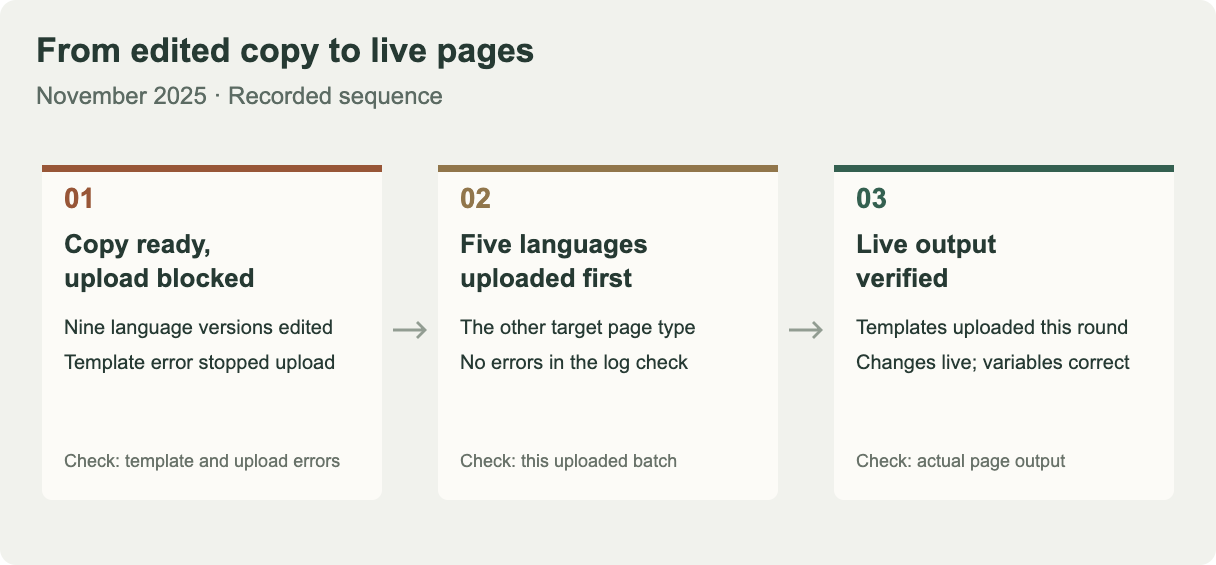
In November, title and description copy had been revised for nine language versions, but template errors prevented the upload. At that point, the copy was ready; there was no evidence that the corresponding pages had changed.
The next confirmed step concerned the other target page type. Korean, Arabic, Spanish, Russian and German templates had been uploaded, and the log check showed no errors. Uploads for product listing pages and the remaining language versions still needed follow-up.
Later, the templates for both page types in this round had been uploaded across the language versions. Live-page checks confirmed that the changes had taken effect and that variables were correct. Verification had reached the actual page output.
“Variables were correct” is an important detail. A bulk template must produce complete copy on a real page. A template containing placeholders cannot show what every page will receive. To check the output, I would look for the intended language, content that matches the page, and any unresolved placeholders.
The upload and live checks established that the templates had taken effect. They did not establish how many individual pages had been inspected. Confirming that coverage would require the template-to-page mapping and a list of the URLs actually checked.
Around 4,000 Dutch keywords were still waiting for upload
Completing the title-template rollout did not complete every SEO task under way at the time.
By early December, keyword-root translations for nine language versions had been reviewed, and the Russian version had been uploaded. Other versions involved special characters that needed additional system support for correct uploads. The roughly 4,000 newly collected Dutch keywords were also still waiting because of special-character issues.
Putting the latest recorded status of each task side by side makes the difference clear.
| Workstream | Confirmed progress | What to check next |
|---|---|---|
| Multilingual title and description templates in this round | Uploaded; live checks confirmed that changes were effective and variables were correct | Retain the page coverage record and track search performance |
| One set of English product listing body-copy templates | Optimization completed; 280 sentences uploaded | Check that live pages use the new copy and read naturally |
| Keyword-root translations for nine languages | Review completed; Russian version uploaded | Confirm special-character support and uploads for the remaining versions |
| Dutch local-language keywords | Around 4,000 terms collected; not yet uploaded | Resolve the upload blocker and verify the imported terms |
These are the latest recorded updates from November to early December 2025, not a snapshot from one day. The 280 figure counts sentences; the roughly 4,000 figure counts keywords. Neither counts live pages.
The Dutch keyword count reflects work already done, but it does not establish that this workflow gained 4,000 usable terms, let alone traffic. The next task was to complete and check the import. Calling the work “local-language keyword optimization completed” would let the next person skip that step and wait for an effect from a change that had not been implemented.
Check real pages, then compare what Google can access
For a similar rollout, I would define the verification sample before editing the copy. Each group should identify its language version, page type and template version. I would then map the expected wording to specific URLs and compare it with the actual output.
The walkthrough below uses one published page. The screenshots were taken on October 14, 2026, with the tools set to English. They illustrate the checking procedure separately from the 2025 case above.
Step 1: Find the title and description in page source
The example is the Chinese edition of Convertos' CTR case study. Open it in Chrome, right-click and select View page source. Alternatively, enter view-source: followed immediately by the full page URL in the address bar.
Use Ctrl+F, or ⌘F on a Mac, to search separately for <title> and name="description". These fields are usually in the HTML <head>. If the source is compressed into one long line, select Line wrap at the top left before searching. You do not need to read through every script link.
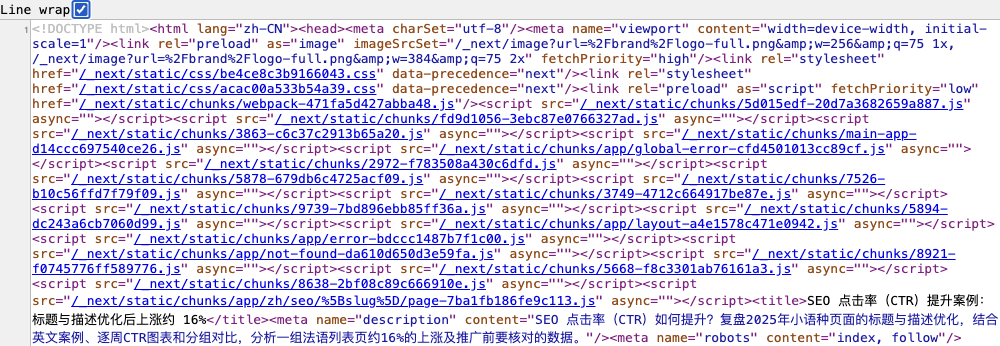
Once you find the fields, read these two pieces of text. The crop below enlarges the title and description from the same page for comparison.

- Read the title in the green area. The text between
<title>and</title>is the SEO title supplied by the page. Compare that wording with the intended edit. - Read the description in the yellow area.
name="description"identifies the field. The copy you need to check is inside the quotation marks incontent="…". - Check these fields even if the visible heading has changed. The body
<h1>and the social-sharing fieldsog:titleandog:descriptionhave their own purposes. A changed page heading does not establish that these two SEO fields changed too.
If JavaScript updates the title or description, also open the developer tools' Elements panel and search for the same fields. Page source and the original Network response show what the server initially returned; Elements shows the page structure after the browser has run scripts. If they differ, check whether Google can obtain the expected content after rendering.
Step 2: Change the User-Agent to Googlebot and compare the same URL
A page that works in an ordinary browser can still have a crawling problem. A site may return different content based on the visitor's identity, cookies, device or access rules. I would therefore add a Googlebot User-Agent simulation to see whether those two request types receive the same title and description.
In Chrome, use the following sequence. Prefer a signed-out window, keep the exact URL fixed, and hold other conditions such as language and region constant:
- Open developer tools, select Network, check Disable cache, and reload. Select the main request with type document / Doc. Record its status code and final URL, then locate the title and description in Response. This is the ordinary-browser baseline.
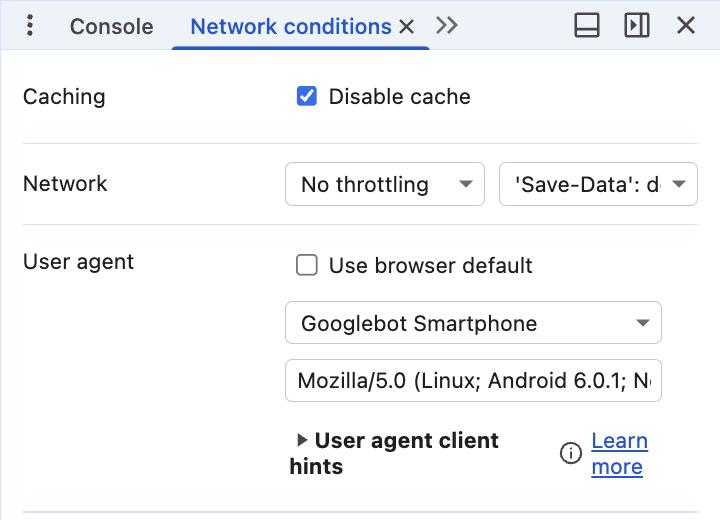
- From the developer tools menu, open More tools → Network conditions. Under User agent, clear Use browser default and select Googlebot Smartphone. If that preset is unavailable, enter a complete custom UA. See Chrome's instructions for the location of these controls.
- Keep developer tools open and reload the same tab. First check Headers → Request Headers → User-Agent to confirm that this request includes the Googlebot identifier. Then inspect the main document's Response. Compare the title, description, status code and redirect destination. Look for a verification page, an unexpected language or an old template.
Expand to copy the mobile Googlebot UA used in this walkthrough
Mozilla/5.0 (Linux; Android 6.0.1; Nexus 5X Build/MMB29P) AppleWebKit/537.36 (KHTML, like Gecko) Chrome/152.0.0.0 Mobile Safari/537.36 (compatible; Googlebot/2.1; +http://www.google.com/bot.html)This was the string used for the local simulation, with the Chrome version taken from the test browser. Update that version as appropriate for your browser; Google's published format is linked below.
Two local HTTP requests to the example URL, one with an ordinary browser UA and one with a mobile Googlebot UA, both returned 200. Their response HTML contained matching title and description values. This local comparison found no difference in those fields.
A User-Agent override is a local simulation. The request still comes from your network, and the browser does not become Google's crawling and rendering system. A server may also verify the source IP. That is why the next check uses Google's own inspection tool. Google's crawler and UA documentation
Step 3: Read the HTML returned in Search Console's live test
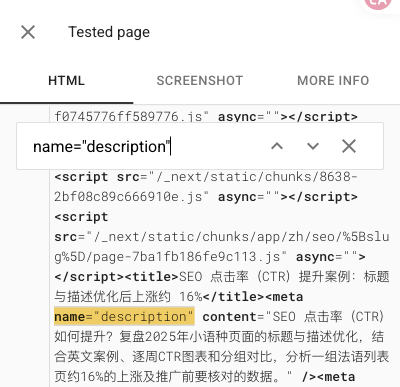
In a Search Console property you can access, enter the same full URL at the top and select TEST LIVE URL. This test returned URL is available to Google, indicating that Google could access the page in that test. Select VIEW TESTED PAGE to inspect what it received.

In the panel on the right, open HTML, search for name="description", and read the wording in content. Search for <title> as well. Both fields in this test matched the source examined earlier. The left screenshot below preserves the actual HTML; the Chinese text belongs to the inspected page.
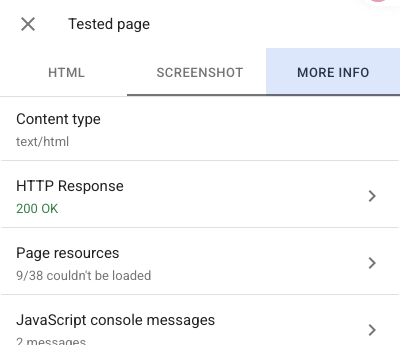
Then switch to MORE INFO. The right screenshot shows HTTP Response: 200 OK, but Page resources also reports 9/38 couldn't be loaded. The test confirms that the title and description were received; resource completeness still needs investigation. Expand Page resources, review the failed items, and check whether they include scripts, styles or images needed for the content before deciding whether they affect verification.
Use SCREENSHOT to inspect the visible content after Google renders the page. This capture shows the article heading and opening text. Check the HTML for the actual title and description values; a visible first screen cannot establish that all content across the page loaded correctly.
Expand the actual Google-rendered page screenshot
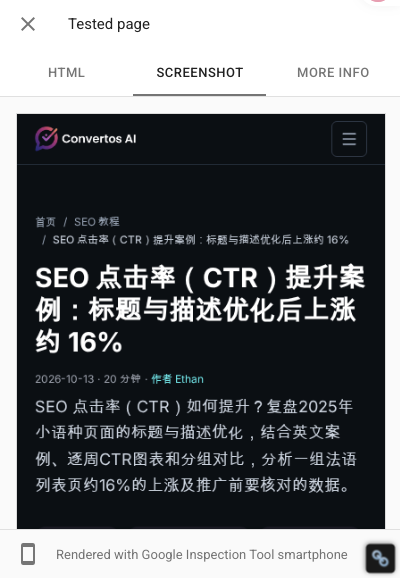
Figure 6. Select SCREENSHOT to see the rendered page. The footer identifies Google Inspection Tool smartphone.
Finally, return to GOOGLE INDEX, expand Page indexing, and locate Last crawl. In this report, the recorded crawl occurred on the evening of October 13, before the October 14 live test. To check what was fetched at that time, open VIEW CRAWLED PAGE when it is available.
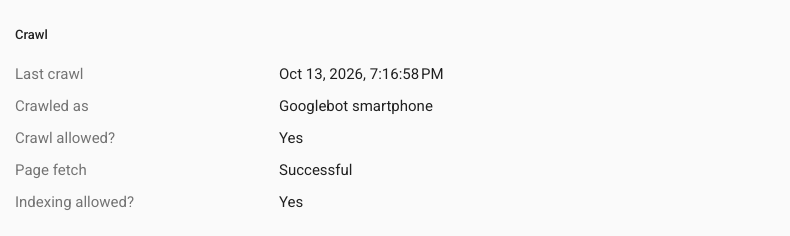
Record the two times separately to distinguish what the current test received from when the crawl recorded in the index report occurred. Live testing uses Google's inspection tool. It is not a routine Googlebot crawl and does not mean Google has reindexed the page on the basis of that test. Search Console URL Inspection documentation
If ordinary access, the UA simulation and Google's live test disagree, record the difference against the same URL before investigating caching, language redirects, script loading and access controls. To verify actual Googlebot requests, also inspect server logs and validate identity using source IP ranges or reverse and forward DNS checks. A “Googlebot” string in a log is not sufficient. Google's request-verification guidance
These are the verification steps I would add after reviewing the case. The sample should include ordinary text, local-language special characters, and pages that exercise different variables. If a repeated error appears, expand the checks to other pages using that template.
Use this blank multilingual SEO rollout verification sheet to record the expected values, ordinary access results, Googlebot UA simulation results and Google test results separately, alongside the URL and time of each check. Record the sampling scope too, so a few successful checks do not become a claim that every page on the site was verified.
When should the CTR comparison begin?
Rollout timing directly affects a before-and-after comparison. If a language version has not been uploaded but is included in the “after” period, the data still contains performance from unchanged pages. Staggered language releases make that mixture more likely.
I would retain the planned date, upload date and live-verification date in the performance record, marking the periods when only part of the rollout was live. Then I would examine the verified page groups separately and keep the full timeline, rather than selecting a few favorable days. When comparing CTR, I would also check for changes in impressions, rankings and query mix.
A page returning a new title does not mean Google Search will immediately show it. Google needs to recrawl and process the page, and title changes may take days to weeks to appear in Search. It may also draw on other page information to construct a title link. Google's title-link guidance
Descriptions need the same distinction. Google generates snippets mainly from page content and sometimes uses the meta description; snippets can also change with the query. Record the page field separately from the actual search appearance rather than expecting them to match word for word. Google's snippet guidance
The live-verification date helps identify which URLs have actually changed. To assess whether a new search title affected CTR, also observe the search appearance and mark the period when the update had not yet carried through. A manual search checks only what appeared for that query at that moment.
The confirmed outcome of this round was that title and description templates moved from a blocked upload to verified live output. The keyword work exposed an upload problem that still needed attention. That establishes implementation progress; it does not establish how much this round increased CTR.
I would first record when each page group actually changed, then examine what happened afterward. Changes that never reached the site go back into implementation work; verified pages can enter the performance review. For the comparison between modified and reference page groups, continue with the title-template and SEO CTR case study.