Google has added a new official visibility signal for how sites appear in generative AI features on Search.54-second English video: how to read Google’s new generative AI performance reports without mistaking visibility for full attribution.
Last updated: June 3, 2026. Google announced new Search Generative AI performance reports in Search Console, with dedicated views for Search and Discover. The reports do not answer every AI search attribution question. They answer the first official one: whether URLs from your site were shown inside Google generative AI features.
Key Takeaways
Google’s new generative AI performance reports give site owners a dedicated Search Console view for visibility in Google generative AI features. The current official reporting language focuses on impressions, pages, countries, devices, and dates. Treat the report as an AI visibility layer, not as full AI click, CTR, query, or citation attribution. SEO teams should combine it with normal Search Console clicks, query data, page groups, SERP checks, and GEO citation accuracy reviews.
What Google Announced
Google’s June 3, 2026 Search Central Blog post says Search Console is adding dedicated generative AI performance report views for Search and Discover. The Search view covers visibility in Google Search generative AI features such as AI Overviews and AI Mode. Google says the data remains included in the overall Performance report, but the new view separates generative AI visibility for site owners.
That distinction matters. This is not a replacement for classic SEO reporting. It is a new layer for a surface that was previously blended into broader reporting.
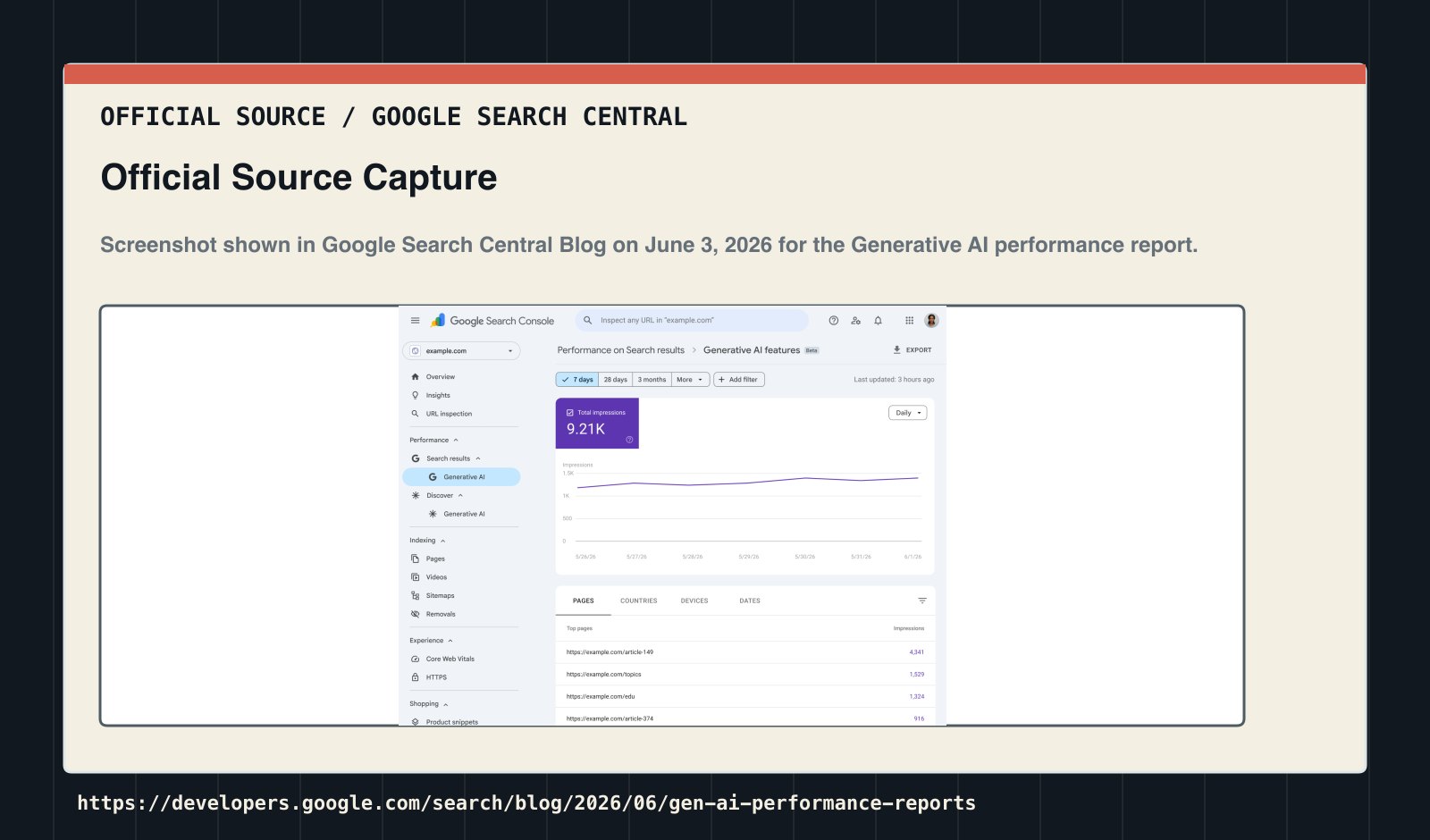
Official source capture: Google’s announcement shows an example Generative AI performance report. Source: Google Search Central Blog.
Do not report universal availability yet
The official announcement dated June 3, 2026 still describes a gradual rollout: the reports were launching for some sites first and would expand before full availability. Wider sightings in August are useful operational evidence, but they do not override Google’s published status. If your property does not show the report, record “not available for this property on this date” instead of treating the absence as zero AI visibility.
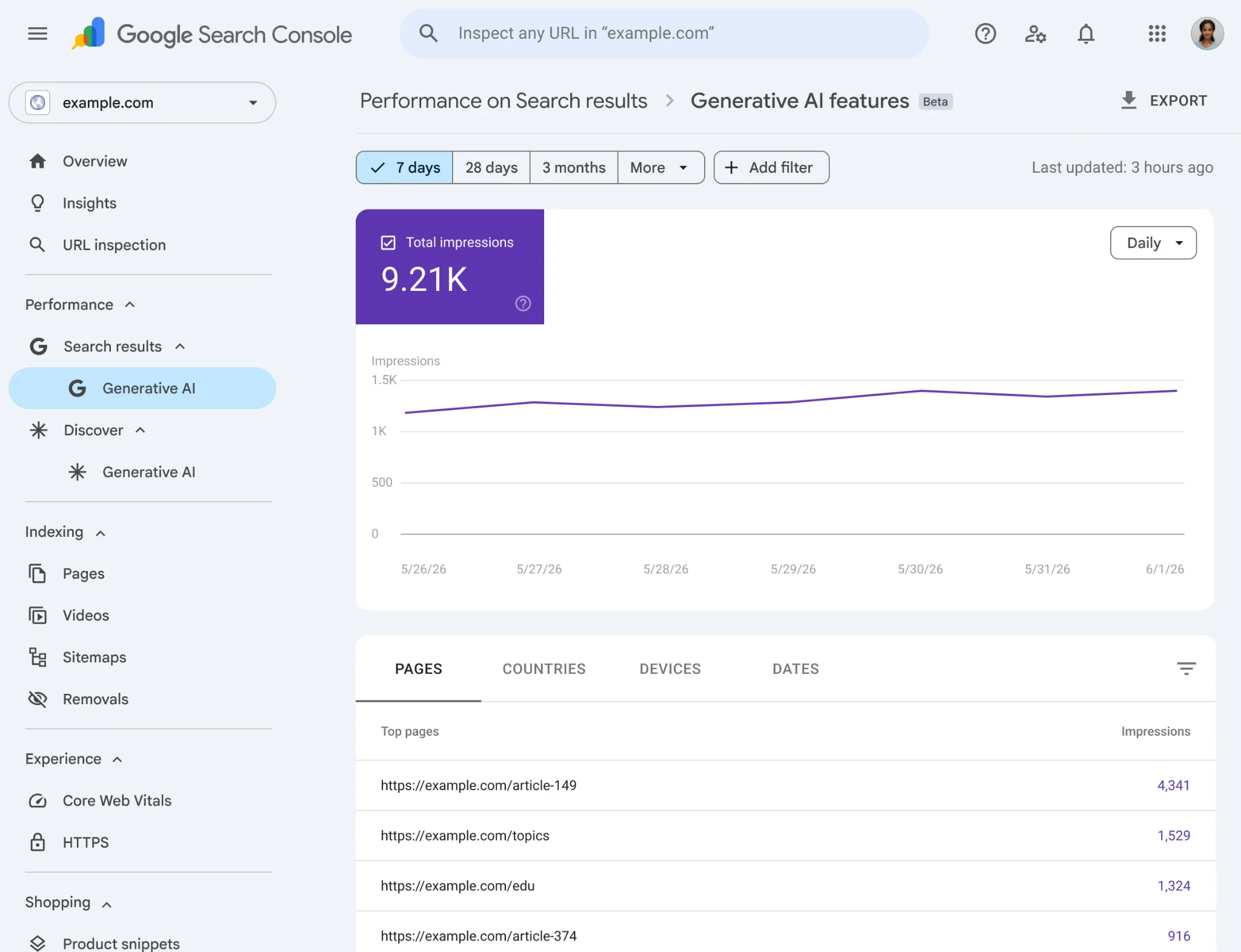
Original Google Search Central screenshot. The report provides a dedicated view of generative-AI feature impressions and dimensions; it is not a complete cross-platform AI attribution report.
The screenshot shows the report’s analytical boundary. You can segment by page, country, device, and date inside Google’s eligible Search or Discover experiences. It cannot reveal ChatGPT or Perplexity visibility, reconstruct an answer’s full citation set, or connect an impression to revenue without additional evidence.
What The Search Report Shows
The Search generative AI performance report answers a practical question: how often URLs from your site were shown in Google Search generative AI features, and which pages, countries, devices, and dates are involved. Google’s Search report help page says the report includes AI Overviews and AI Mode, and does not include data from Search Labs experiments.
Dimension
Official meaning
How SEOs should use it
Impressions
Times URLs from your site were shown in Search generative AI features
Track AI visibility trend first; do not infer clicks directly
Pages
URLs that appeared in AI features, usually assigned to the canonical URL
Identify the pages responsible for AI visibility
Countries
Countries where the search originated
Review international and localized visibility
Devices
Device type for Search results
Compare mobile, desktop, and tablet visibility
Dates
Hourly, daily, weekly, and monthly granularity
Prefer weekly reviews over one-day reactions
Aggregation is a key detail. Google says chart data is aggregated by property; if two results from the same site appear in one generative AI search results feature, they count as a single chart impression. Table aggregation changes based on the selected dimension. This means chart totals and table totals can differ, and that difference is not automatically a bug.
Discover Is A Different Report
The Discover generative AI performance report is for generative AI features in Google Discover. Google’s Discover report help page says a link must be scrolled into view to count as an impression. It also says only one impression is counted per result per session, even if the user scrolls past the card and then comes back.
Keep Search and Discover separate. Search is closer to a user asking for information. Discover is closer to a feed experience. If you merge them too early, you may misread whether a page gained search-demand visibility or feed visibility.
Comparison
Search generative AI report
Discover generative AI report
User context
AI Overviews, AI Mode, and related Search features
Generative AI features in Discover
Main use
Query-driven AI search visibility
Feed-driven AI visibility
Device dimension
Available in the Search report
Not listed as a Discover dimension in the official help page
Page attribution
Usually assigned to canonical URL
Assigned to the canonical source page
Best comparison
Search Performance, SERP layout, page groups
Discover Performance, topic clusters, countries
What You Cannot Read From It Yet
This is where teams need discipline. The official announcement and help docs focus on impressions and dimensions such as pages, countries, devices, and dates. They do not describe this as full AI click attribution, AI CTR reporting, query reporting, or a fine-grained citation report that tells you which passage was used in which AI answer.
Avoid these mistakes:
Do not treat AI impressions as AI traffic.
Do not infer CTR directly from impressions.
Do not assume the absence of the report means the site has zero AI visibility.
Do not add Search and Discover impressions together and call them one metric.
Do not include Search Labs experiments; Google says those are not part of the report.
The cleaner interpretation is that Google has added an official visibility layer. Clicks, queries, citation position, answer accuracy, and competitor citation still need normal GSC data, SERP observation, third-party tracking, and human QA.
Why Some Sites Will Not See It
If you do not see the report in Search Console, it may not be a setup problem. Google says these reports are rolling out to a subset of websites for testing and feedback. The help pages also mention another common reason: a site may not have enough impressions in Google Search or Discover generative AI features.
There is also a governance setting to check: Search generative AI control. Google’s control documentation says site owners can choose include, exclude, or inherit. Include is the default. If a site is excluded, its content will not appear in the applicable generative AI features and it will not receive traffic or impressions from those features. Google also says this control is not used as a ranking or inclusion signal for other parts of Search.
Reason the report may be missing
What to check
The rollout has not reached the property
Wait or check other Search Console properties
The site has too few AI feature impressions
Review a longer window and key countries/page groups
The site excluded generative AI features
Check Settings > Search generative AI
A child property inherited a parent setting
Review domain and URL-prefix property inheritance
The team is only viewing the normal Performance report
Look for the dedicated Generative AI performance report entry
How SEO Teams Should Use It
The most useful workflow is to add the report to weekly SEO/GEO review, not to create a disconnected “AI report.” The report shows which pages have AI-feature visibility. Decisions still require other data.
Use this workflow:
Export the Search generative AI report and Discover generative AI report every week.
Group pages by type: blog, tools, product pages, case studies, definitions, comparisons.
Put AI impressions next to normal Search Console clicks, impressions, and queries.
For priority pages, manually record the SERP layout: AI Overview, AI Mode entry, forums, video, news, or shopping modules.
Run GEO QA for pages with AI visibility: does the AI answer describe the brand, product, pricing, features, and limitations correctly?
Review monthly: which pages are strong in classic Search, and which are starting to appear in AI features?
If you already track AI search visibility, treat this report as an official Google visibility signal. It does not replace Citation Check or human answer QA, but it makes the “was this page visible in Google AI features?” question less speculative. If your team is still building the review workflow, pair the technical checks in the SEO hub with citation and answer monitoring from the GEO hub.
What To Change In Content And Technical SEO
Google’s generative AI optimization guide says that, from Google Search’s perspective, optimizing for generative AI search is still optimizing for the Search experience. In plain terms: this report does not make SEO obsolete. It adds an AI visibility dimension to SEO.
Prioritize these changes:
Add clear definitions, answer blocks, steps, comparison tables, and source notes to important pages.
Write quotable fact blocks for product claims, features, pricing, use cases, and case studies.
Give useful context to images and videos through alt text, captions, and surrounding copy.
For multilingual pages, verify hreflang, canonical URLs, and localized content quality.
If robots or crawl rules may be part of the problem, check the basics with the robots.txt validator before treating the issue as a content rewrite.
Avoid these moves for now:
Do not generate large sets of thin pages just to chase fan-out queries.
Do not force every article into the same AI-summary template.
Do not present unsourced opinions as facts.
Do not delete a page only because AI impressions are low; first check classic clicks, conversions, and brand value.
A Practical Review Table
Field
Data source
Question answered
AI Search impressions
Search generative AI performance report
Was the page shown in AI Overviews, AI Mode, or related features?
AI Discover impressions
Discover generative AI performance report
Was the page shown in Discover generative AI features?
Page URL
New report + normal GSC
Which pages are responsible for AI visibility?
Country / device / date
New report
Where, how, and when did visibility appear?
Clicks / CTR / queries
Normal Performance report
Did visibility translate into search clicks, and for which queries?
AI answer accuracy
Human QA or GEO monitoring
Did the AI answer describe the brand and facts correctly?
Competitor cited
SERP checks or AI visibility tools
Did competitors replace your page as the cited source?
Next action
SEO/GEO review
Technical fix, content improvement, internal links, source strengthening, or observation
The table helps separate signals. If AI impressions rise but clicks fall, the AI surface may be changing the click path. If AI impressions fall but normal clicks are stable, AI feature triggering may have changed. If a page has high AI impressions but the answer describes the product incorrectly, that page may deserve attention before a small classic ranking decline.
FAQ
When did Google launch the generative AI performance reports?
Google announced the new Search Generative AI performance reports on June 3, 2026. The announcement describes dedicated report views for Search and Discover, rolling out first to a subset of website owners.
Source signal: Google Search Central Blog announcement.
Does the report include AI Overviews and AI Mode?
Yes for the Search report. Google’s Search Console help page says the report includes AI Overviews and AI Mode, and notes that the supported-feature list may change over time.
Source signal: Search Console Help documentation for the Search generative AI performance report.
Does the report show AI search clicks and CTR?
The current official docs emphasize impressions and dimensions such as pages, countries, devices, and dates. Treat it as a visibility report, not as complete AI click, CTR, query, or citation attribution.
Source signal: Google’s announcement and Search report help documentation.
Why can’t I see the report in Search Console?
Possible reasons include staged rollout, too few generative AI impressions, or exclusion through Search generative AI control. Check the property, time window, visibility level, and Settings > Search generative AI.
Source signal: Search Console Help report-availability notes and Search generative AI control documentation.
How are Discover AI impressions counted?
Google’s Discover help page says the link must be scrolled into view to count, and only one impression is counted per result per session. This differs from the Search report, so keep the reports separate.
Source signal: Search Console Help documentation for the Discover generative AI performance report.
What does this mean for GEO?
It gives GEO teams an official Google visibility signal for pages shown in generative AI features. GEO still needs separate checks for answer accuracy, cited URLs, competitor citations, and whether the page is structured in a way AI systems can quote.
Source signal: Google’s announcement, Search Console Help, and Google’s generative AI search optimization guide.
Source Statement
This article is based on Google’s June 3, 2026 announcement, Search Console Help documentation, and Google’s official generative AI search optimization guide. The workflow recommendations are for SEO/GEO operations and do not claim access to unpublished Google metrics, ranking factors, or future features. Time-sensitive decisions should be checked against Google’s official documentation and your own Search Console property.