Cover image and workflow summary for How to Automate Perplexity Brand Visibility Reports.English voiceover video: How to Automate Perplexity Brand Visibility Reports.
Perplexity brand visibility reporting is a repeatable way to measure how often a brand appears in Perplexity answers, which sources are cited, how the answer frames the brand, and what changed over time. Perplexity is especially useful for this workflow because source visibility is central to its search experience.
Use official documentation as the boundary for platform claims. Perplexity documents its crawlers, its Search API guide, and guidance around citations. Those docs do not replace your own prompt testing, but they give the technical team a reliable starting point for access, source capture, and citation parsing.
Quick Answer
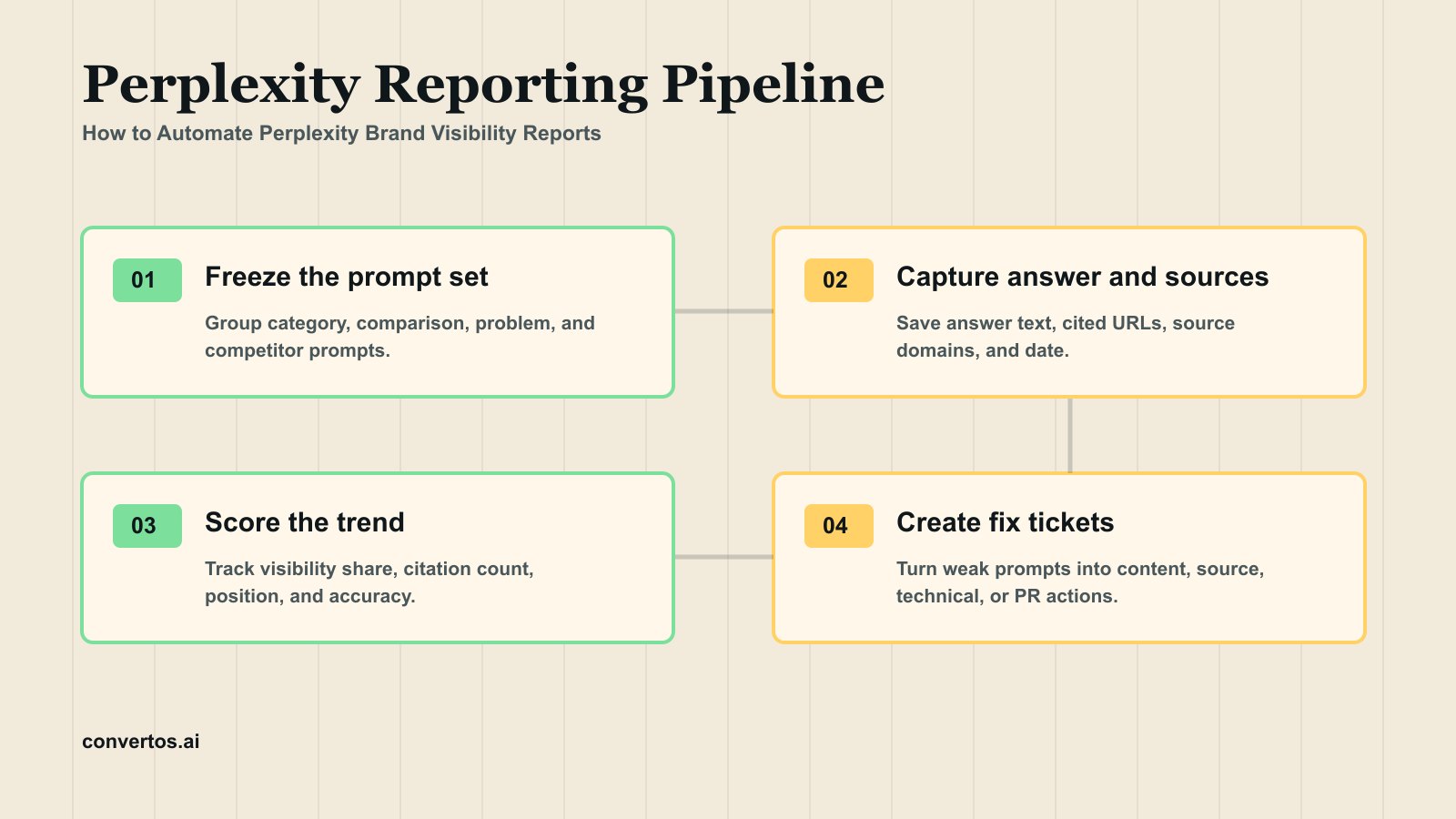
To automate Perplexity brand visibility reports, freeze a prompt set, run the same prompts on a fixed cadence, capture the answer text and cited sources, extract brand and competitor mentions, score visibility and citation quality, then turn weak prompts into content, technical, or digital PR actions. A useful report should show not only where the brand appeared, but which source caused the appearance and what the team should fix next.
This is why Perplexity reporting should be more source-heavy than a generic AI visibility report. The citations are not decoration. They are the repair map.
If the team is still defining the measurement model, use an AI visibility check to establish the first prompt baseline, then connect the weekly report to the AI brand visibility tracking workflow. That keeps Perplexity reporting tied to the same visibility, citation, and competitor metrics used across other AI answer surfaces.
What To Capture In Every Run
Every Perplexity report needs a stable data row for each prompt. Without the raw answer and cited URLs, the dashboard becomes a score without evidence.
The row should preserve what a reviewer would need one month later: the exact prompt, answer text, citation list, source domains, brand wording, competitors, and action owner. Perplexity's citation guidance is useful here because the report should not treat a citation as a plain backlink. A citation is evidence that a specific answer leaned on a specific source at a specific run time.
Keep raw fields separate from scored fields. Raw answer text and cited URLs should not be overwritten when a score changes, because they are the audit trail. Scored fields, such as source quality or sentiment, can be revised as the team improves the rubric.
Field
Why it matters
Example use
Prompt text
Keeps trend data comparable
Group prompts by category, use case, and buyer stage
Run date
Makes volatility visible
Compare week-over-week movement
Answer text
Preserves the exact brand framing
Review sentiment, accuracy, and omitted facts
Brand mention
Measures presence
Calculate visibility share
Competitor mention
Shows shortlist pressure
Identify prompts where competitors own the answer
Cited URL
Shows the evidence source
Improve the page or earn a better source
Source domain
Reveals source mix
Separate owned site, review sites, forums, media, and directories
Action owner
Turns reporting into work
Assign content, technical, or PR follow-up
Prompt Set Design
The prompt set is the report's foundation. Do not change it every week unless you are intentionally creating a new segment. Stable prompts let you see whether the brand is improving or merely moving because the test changed.
Design the prompt set around buyer intent, not only keywords. Category prompts show whether the brand is visible in broad discovery. Problem prompts show whether the brand is associated with a painful job. Comparison prompts test whether product facts are clear. Competitor prompts reveal whether the brand appears when users are leaving an alternative. Branded prompts catch inaccurate descriptions that can hurt sales conversations.
When the report uses automation, keep the prompt text and retrieval settings documented beside the run. Perplexity's Search API guide gives implementation teams a starting point, but the editorial team still needs to own the prompt taxonomy and the interpretation of changes.
Prompt group
Example
What it reveals
Category prompts
Best AI visibility platform for B2B SaaS
Whether the brand is eligible for broad shortlist answers
Problem prompts
How do I know if AI answers cite my brand?
Whether the brand owns the pain point
Comparison prompts
Convertos.ai vs other AI visibility tools
Whether product facts are clear enough for side-by-side answers
Competitor prompts
Alternatives to a known competitor
Whether the brand appears when users leave a rival
Branded prompts
Is Convertos.ai good for GEO monitoring?
Whether Perplexity describes the brand accurately
Weekly Reporting Workflow
Lock the prompt set. Keep core prompts stable and add experimental prompts in a separate tab.
Run Perplexity checks. Capture answer text, cited URLs, source domains, and visible answer framing.
Normalize entities. Map brand name variants, product names, competitor aliases, and source domains.
Score each prompt. Use visibility, citation, sentiment, accuracy, source quality, and competitor overlap.
Compare against the previous run. Highlight new mentions, lost mentions, new cited sources, and source drift.
Assign actions. Content gaps become page updates; source gaps become PR or directory work; access gaps become technical tickets.
Rerun after fixes. A report is not complete until fixes are retested.
This workflow is also where the crawler layer belongs. Before blaming content quality, check whether important public pages are discoverable and not blocked by technical rules. Perplexity's crawler documentation gives engineering teams the current official reference for that review.
Infographic: the core workflow behind How to Automate Perplexity Brand Visibility Reports.
KPI Scorecard
The scorecard should separate visibility from evidence quality. A brand mention without a useful source may still be fragile. A citation from a trusted owned page or credible third-party page is more actionable than a mention with no traceable source. For monthly reporting, show both the trend and the action tied to the trend.
KPI
Definition
Healthy signal
Warning signal
Visibility share
Brand-mentioned prompts divided by tracked prompts
Upward trend across stable prompt groups
Brand appears only in branded prompts
Citation count
Number of cited URLs connected to brand-relevant answers
Owned pages and credible third-party pages both appear
Only weak directories or competitor pages are cited
Citation position
Whether useful sources appear early in the cited source set
Product, docs, or review pages appear near the top
Important sources appear late or not at all
Answer accuracy
Important facts are correct
Category, audience, features, and limits are described accurately
Wrong features, stale pricing, or vague positioning
Competitor overlap
Prompts where competitors appear with or instead of the brand
Competitor overlap is understood and explainable
Competitors dominate high-intent prompts
Action closure
Fixes completed and retested
Each weak prompt has an owner and outcome
Reports repeat the same finding with no action
From Report To Fix
The report should end with a work queue, not a chart dump.
Each finding should answer three questions: what changed, why it likely changed, and who owns the next fix. If a competitor replaced the brand in a high-intent answer, the action may be a comparison page. If Perplexity cites a weak directory instead of your product page, the action may be content structure or crawler access. If the brand is mentioned but described wrongly, the action is entity cleanup across public source pages.
Use the AI visibility metrics guide to keep executive reporting consistent. Leaders should see visibility share, citation quality, competitor overlap, and fix closure together, not four disconnected charts.
Finding
Likely cause
Action
Brand absent, competitors cited
Missing comparison or category source page
Publish a direct comparison or buyer guide with evidence
Brand mentioned but not cited
External sources describe the brand, but owned pages are weak
Strengthen product, docs, or case study pages
Wrong feature or old positioning
Public facts are inconsistent
Update homepage, product pages, About page, schema, and profiles
Only directory pages cited
Owned content lacks extractable answers
Add answer blocks, tables, caveats, and internal links
Strong visibility but poor sentiment
Reviews or community discussions surface unresolved objections
Address objections publicly and improve proof pages
Common Mistakes
Mistake
Why it hurts
Better approach
Changing prompts every run
Trend lines become meaningless
Keep a stable core prompt set and separate experiments
Reporting only mention count
Mentions can be wrong or unsupported
Pair mentions with citations, wording, and source quality
Ignoring source domains
You cannot fix what you cannot trace
Track cited URLs and group source types
Treating one run as truth
AI answers can vary
Look at repeated trends and material movement
Ending with a dashboard
The team still needs work to do
Convert each weak prompt into a fix ticket
FAQ
Why is Perplexity useful for brand visibility reporting?
Perplexity is useful because cited sources are visible and central to the experience. That makes it easier to connect a brand mention to the page or domain that influenced the answer.
Source signal: recurring prompt-cluster questions around AI citation tracking and Perplexity's public citation documentation.
Can I automate Perplexity reporting with an API?
Perplexity provides API documentation, but implementation choices depend on your plan, compliance needs, and how you store prompt and citation data. Keep the report auditable by saving answer text and cited URLs.
Source signal: Perplexity Search API documentation plus workflow questions about storing answer text, cited URLs, and run metadata.
How often should I run Perplexity visibility reports?
Weekly reporting is enough for most active GEO programs. Daily checks can be useful during launches, migrations, or reputation events, but weekly trends are easier to interpret.
Source signal: AI visibility reporting patterns from prompt-cluster tracking; cadence is a reporting recommendation, not a Perplexity guarantee.
What should a Perplexity report show executives?
Show visibility share, key cited sources, competitor overlap, notable wording risks, and the three actions most likely to improve next month's results.
Source signal: executive reporting questions in the prompt cluster and KPI modules used for AI visibility scorecards.
Source Statement
This article was prepared on June 14, 2026 using Perplexity official documentation, existing SERP research in this project, competitor reporting patterns, and Convertos.ai's AI visibility workflow. Perplexity product behavior, API fields, and crawler behavior can change; verify technical implementation against official Perplexity docs before production automation.